
Registering a patient
The five steps of registration, what is actually required, how drafts work, and how to avoid creating a second record for somebody you already have.
3 min read
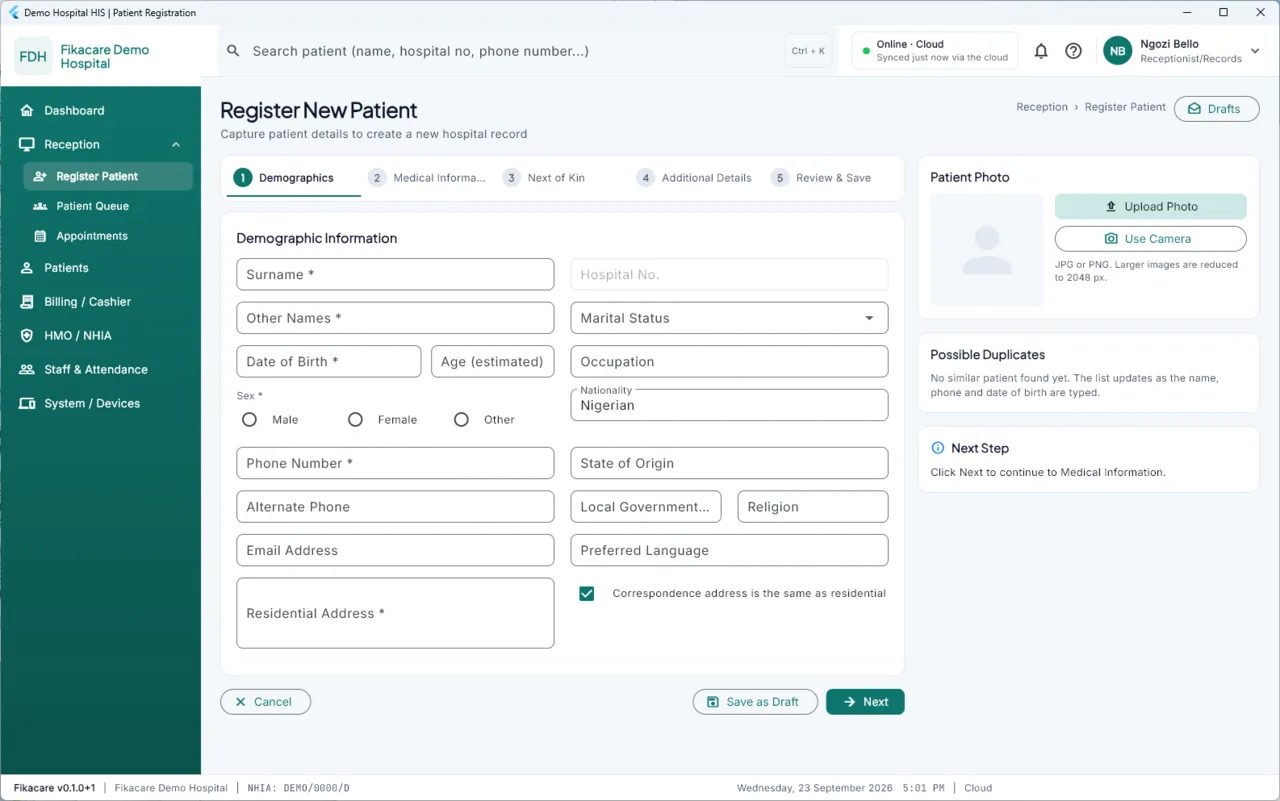
Choose Reception → Register Patient.
Before you start: check they are not already there
The commonest problem in any hospital's records is the same person appearing
twice. Before registering, press Ctrl + K and search — by phone number as
well as by name, because names are spelt several ways and a phone number
usually is not.
The registration screen also helps: a Possible duplicates panel beside the form updates as you type the name, phone and date of birth. If somebody appears there, stop and open them instead.
If you do end up with two records for one person, they can be merged. See Two records for the same person.
The five steps
1. Demographics. Surname, other names, date of birth, sex, phone number and residential address are required; everything else can wait. A photo can be uploaded or taken from the machine's camera, and appears on the patient's profile. If the patient does not know their date of birth — common enough — put an estimated age and the system works back from it.
Leave Hospital No. empty and one is issued from this machine's block. Only type one in if you are entering somebody who already has a card with a number on it. See Where numbers come from.
2. Medical information. Blood group, genotype, known allergies, chronic conditions. Allergies are worth the extra thirty seconds: they show on every clinical screen afterwards, with a stricter banner.
3. Next of kin. Name, relationship and a phone number.
4. Additional details. Occupation, religion, language, state of origin, and how they pay — self-paying or an HMO or NHIA scheme, with their enrollee number.
5. Review and save. Everything on one screen before it is recorded.
Drafts
Drafts at the top right keeps a half-finished registration. If a patient goes to find their card, or the queue suddenly matters more, leave it and come back. Drafts stay on this machine and are not sent anywhere until saved.
What happens when you save
The patient is recorded and given a hospital number, immediately, on this machine, whether or not there is a connection. You can print their card and open a visit at once.
The registration then goes into this machine's queue to be sent on. If the hospital is offline it waits there, and nothing about the patient's care waits with it.