
Receipt continuity and missing numbers
The report that accounts for every receipt number the hospital reserved. It should be clean every day, and what it flags is worth chasing.
2 min read
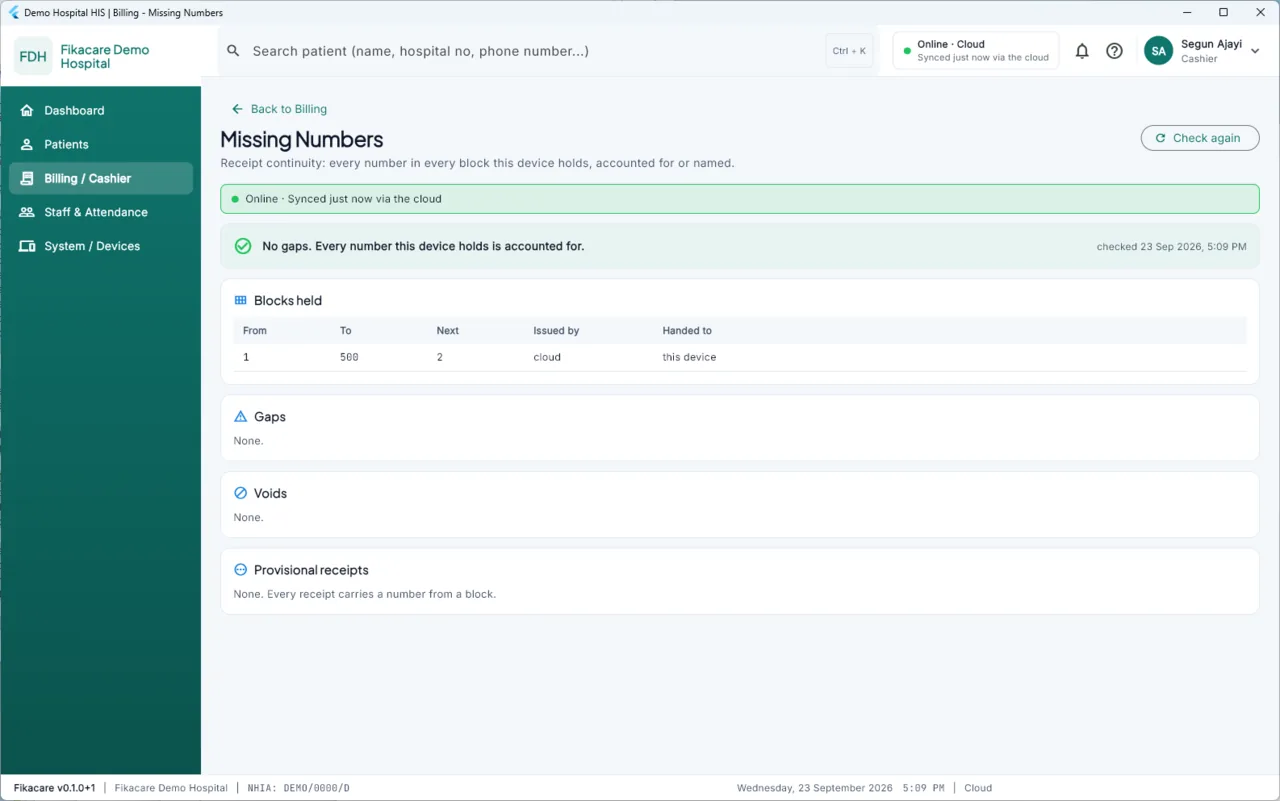
Find it in Billing / Cashier, and as Gaps in the daily brief.
What it does
Fikacare knows every receipt number it reserved and which machine reserved it. So it can say, for any range, what happened to each one:
Used — a receipt was issued. Normal, not listed.
Voided — issued and then voided, with reason and authoriser. Listed, with the reason, so a void is never invisible.
Reserved and never used — a number this machine took and did not issue. This is the one to chase. Usually harmless — the machine was reinstalled, or a block was replaced — but it is also exactly what an issued-and-destroyed receipt looks like.
In another machine's block — not yours, not missing, not listed. This is why your own numbers jump and why the jump is not a gap.
What "clean" means
At the end of a day, every number in your hospital's reserved ranges is either issued, or voided with a reason, or explained. That is the state to aim for and it is achievable — the report was clean through the hospital's first live week.
When it is not clean
Do not wait. The value of this report is entirely in it being looked at daily; a gap from three weeks ago is one nobody remembers.
- Note which machine reserved the number and roughly when.
- Ask whoever was on that machine. A reinstall, a crash mid-receipt or a replaced block accounts for most of them.
- Record what you found. The explanation is worth more than the gap.
Why it exists
A paper receipt book is controlled by its own numbering: a missing leaf is visible. Computerised billing loses that control unless it is deliberately rebuilt, and a system where numbers are handed out by machines that may be offline for a day could lose it very easily.
So the numbering is built to be auditable from the start, and this report is where you audit it.