
Opening a visit
A visit is one attendance. Opening one issues a queue ticket and puts the patient in a department's queue.
2 min read
A visit is one attendance at the hospital. Everything that happens that day — the consultation, the tests, the charges — hangs off it.
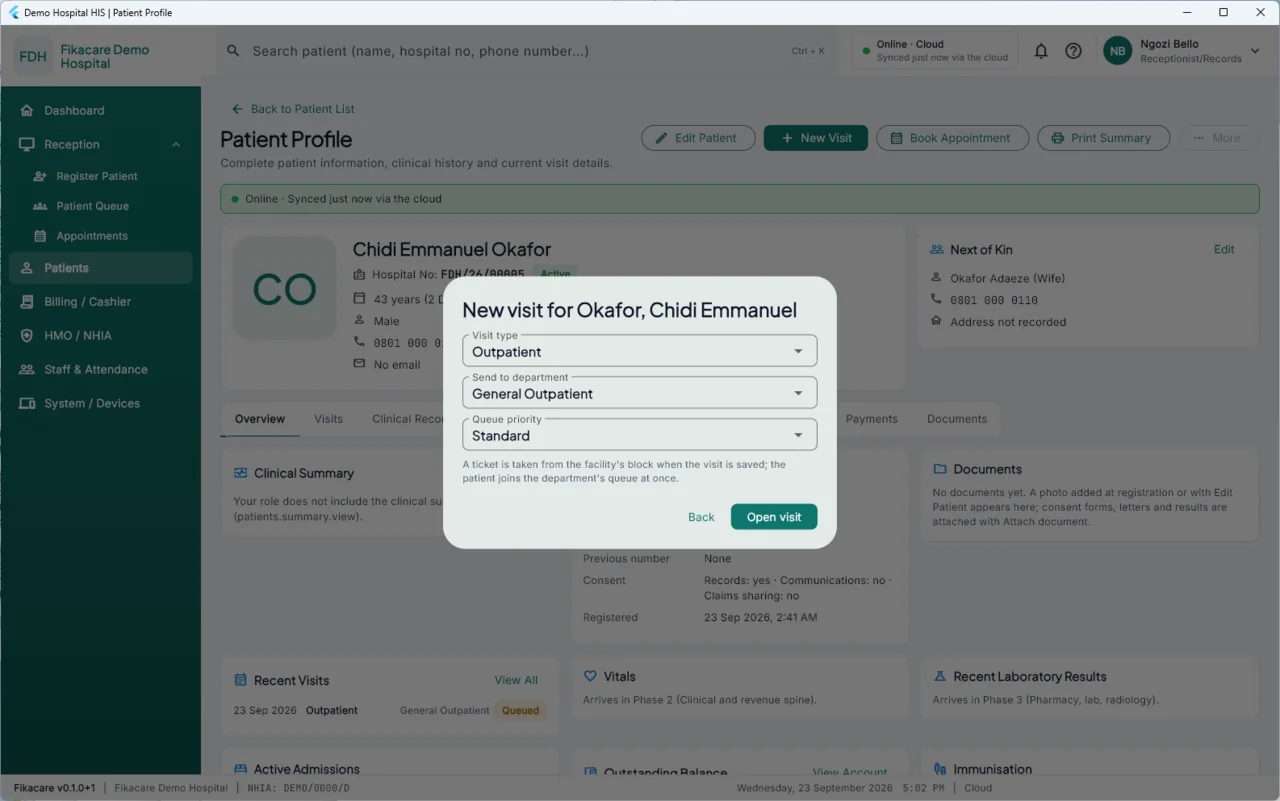
Opening one
From the patient's profile, choose New Visit. You are asked three things:
Visit type — Outpatient, and in later stages inpatient and the others.
Send to department — which queue the patient joins. General Outpatient, Antenatal, and whichever others your hospital has set up.
Queue priority — Standard normally. Raise it for somebody who should not wait their turn. Priority changes the order of the queue, and who set it is recorded, so it is a decision with a name on it rather than a quiet reshuffle.
Choose Open visit. A ticket is taken from the facility's block and the patient joins the department's queue immediately.
The ticket
The ticket number is what is called in the waiting room. It comes from this machine's reserved block, so two desks registering at once cannot hand out the same one, even offline. See Where numbers come from.
Print it from the queue with Print Queue, or from the visit.
One visit, not several
Open one visit for one attendance, even if the patient will see several departments. Sending them on to the laboratory or the pharmacy does not need a new visit — they move between queues within the same one. Opening a second visit for the same day splits the record and the bill in two.
Closing
A visit is closed when the patient is finished. Charges raised against a visit stay attached to it whether or not it is closed, so closing is about the queue and the day's counts rather than about the money.
If a patient leaves before being seen, mark it. It is one of the figures in the daily brief — "Left without being seen" — and it is one of the more useful things a manager can know.